Our certified technicians handle the entire authorized flashing handshake via remote desktop while you watch safely.
Multi-language international variants. Restores official stock factory ROM, re-enables dual SIM/eSIM, Widevine L1, and NFC.
Factory unlocked and carrier (T-Mobile/Verizon) North American builds. Restores pristine stock modem and VoLTE/VoWiFi.
European Union official builds. Full support for EU regulatory standards, safety partition tables, and OTA updates.
Fixes anti-rollback bricking, corrupted regional partitions, or cross-converted devices with complete factory stock integrity.
Your device connected via USB cable in 9008 Mode. UltraViewer or AnyDesk running.
Authorized Firehose handshake server & factory stock partition flash.
OnePlus 13 PJZ110 region unlock Service
INSTANT REMOTE QUEUE
OFFICIAL MSM / OPLUS EDL
QUALCOMM SNAPDRAGON 8 ELITE
OnePlus 13 PJZ110 region unlock Service
SKU: MGU-OP13-EDL-8E
✅ IN STOCK (LIVE SLOTS OPEN)
🕒 Next Tech Ready: ~5 Minutes
⚠️ What is your phone's current symptom?
Permanent Qualcomm Emergency Download Mode Recovery
Unlike consumer repair shops using cracked flashtool binaries that can trigger Qualcomm cryptographic fuse trips, we connect directly through certified authorized technician credentials to push official oxygenOS/ColorOS factory partitions.
Symptoms & Soft/Hard-Brick States We Remotely Repair
Qualcomm CrashDump Mode
Triggered when sub-system kernel watchdog panics occur in abl, xbl, or modemst partitions.
Complete Black Screen / No Power
Device shows no LED, no screen backlight, but registers as QDLoader 9008 in Windows Device Manager.
Continuous Bootloop / Fastboot Stuck
Reboots endlessly at 1+ logo or stuck in Fastboot Mode with “Device corrupt cannot boot” message.
ColorOS to OxygenOS Regional Brick
Corrupted partition tables caused by cross-flashing Chinese hardware variants without proper EDL repacking.
Failed OTA or Magisk Root Brick
OTA system updates applied over patched boot images resulting in dm-verity corruption and boot failure.
Destroyed ABL / XBL / RPM / PMIC Tables
Total bootloader destruction recoverable exclusively via emergency Sahara / Firehose programmer protocols.
1. Windows PC (Win 10/11)
A desktop or laptop running 64-bit Windows 10 or 11 with administrator privileges to install Qualcomm QDLoader 9008 drivers.
✓ Drivers provided if missing
2. Stable Internet Connection
At least 15 Mbps download speed. Our server authenticates remote session tokens and downloads full factory unbrick image archives.
✓ High-speed CDN links ready
3. Original / Quality USB Cable
Use the red OnePlus Warp/SUPERVOOC cable or quality USB-A to USB-C cable. Avoid hubs; plug directly into rear motherboard ports.
✓ Direct USB 2.0/3.0 port
Remote Access Tools (Install before session):
01
Order & Config
5 Minutes
Select your OnePlus model, enter variant details, and book your unbrick session.
02
Remote Connect
Immediate Queue
Download UltraViewer or AnyDesk and share your session ID with our technician.
03
EDL & Auth
Qualcomm Sahara
Device enters EDL 9008 mode. Technician pushes official OnePlus cryptographic RSA token.
04
Flash & Boot
10-15 Minutes
Full factory partitions written and phone boots cleanly into stock OxygenOS wizard.
Average response & initiation time: ~5 minutes
What is EDL Mode and why do I need authorized credentials to flash?
Emergency Download Mode (EDL / 9008) is Qualcomm’s lowest bootloader level ROM fallback. On OnePlus 8 and newer models, OnePlus cryptographically signed the Sahara/Firehose protocols, requiring active RSA challenge-response tokens generated through an authorized employee account to authenticate flashing.
Is my data preserved during the unbrick procedure?
In 95% of hard-brick cases with corrupted partition tables (ABL/XBL/BOOT), factory flashing rewrites system images and formats user data to guarantee boot recovery. If your bootloader is unlocked and partitions intact, advise your technician beforehand.
What happens if my phone cannot be unbricked due to hardware failure?
We offer an ironclad 100% money-back guarantee. If our technician verifies via UltraViewer diagnostics that your device has catastrophic hardware damage (dead UFS NAND or fractured CPU solder balls), you receive an immediate full refund.
Do I need to open the back cover of my phone for test points?
In 98% of cases, opening the phone is completely unnecessary! OnePlus devices enter Qualcomm 9008 EDL mode via simple button combinations (Holding Volume Up + Volume Down while plugging into PC) or standard deep-flash cables.
Can this service lock or relock my bootloader?
Our factory EDL flashes return the device to complete official stock OxygenOS or ColorOS with signed original keys. You can specify whether you want the bootloader locked (for banking apps/Widevine L1) or left unlocked.
What payment methods are supported and how fast do we start?
We accept Binance ID Pay, direct USDT (TRC-20 & BEP-20), Ethereum (ERC-20), and Binance Gift Cards purchased via credit/debit card on G2A, Driffle, Eneba, OffGamers, and K4G. Technicians dispatch within 3 to 7 minutes.
There are restrictions on the calling function in your region. Please contact your place of purchase to resolve the problem”
How to Check region lock on OnePlus 13 5G:
First Dial *#*#3932433284#*#* and check the state
Status indicates if your Device is Region locked or Unlocked According to the Area and This:
state: 1 – The region lock is currently Enabled and Device is locked.
state: 0 – The region lock is activated, but temporary disabled. (Not in the blacklisted area / Using a China SIM)
state: -1 – The region lock is not activated, but if you use a SIM from blacklisted area, the state will become 1.
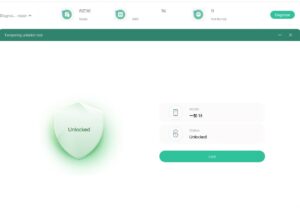
state: 2 – The region lock existed, but Device is unlocked. (This services)
Supported Symptoms & Fixed Issues
Our technicians utilize official EDL (Emergency Download Mode) protocols to resolve advanced software corruption, including:
Permanent Boot Loops
Device is trapped cycling on the boot logo and fails to initialize.
Hard-Bricked / EDL Mode
Device shows no signs of life, a black screen, or is only detected via Device Manager.
Fastboot / Recovery Loop
Device is locked within the bootloader or stock recovery menus and cannot boot system partitions.
“System Destroyed” Error
Critical partition corruption displaying integrity verification failures.
Display Corruption (White Screen)
Corrupted display driver partitions caused by incompatible firmware flashing.
Why Choose MGUNLOCK?
Enterprise-grade remote infrastructure, certified diagnostic engineers, and zero physical shipping required.
🌐 100% Remote Deployment
No logistics, no shipping delays, and no risk of transit damage. The entire provisioning and flashing process is executed over an encrypted remote desktop session while the device remains in your possession.
⏱️ Instant Execution & 24/7 Availability
We operate on an on-demand deployment model. Once your workstation is configured, a senior technician is assigned to your session immediately to minimize downtime.
🔒 Enterprise-Grade Security & Official Firmware
We strictly deploy pristine, official factory stock images. Your session is fully transparent; you can monitor every command and tool execution on your monitor in real-time.
🏆 4 Years of Industry Expertise
With over a decade of specializing in Android partition recovery, Qualcomm EDL architectures, and specialized service tools, our team handles complex brick cases with a near-perfect success rate.
Technical Infrastructure Requirements
Before initiating your session, please ensure your environment meets the following specifications:
Service Workflow: Step-by-Step
Secure Service Order
Purchase the Recovery Service
Prepare Your Workstation
Install your preferred remote desktop client and connect the bricked Device to a USB port.
Submit Session Credentials
Provide your secure remote desktop ID and password to our support technician via your order confirmation portal.
Remote Restoration
Our technician establishes the connection, configures the necessary flashing environment, maps the Qualcomm interface, and flashes the official firmware.
Quality Assurance & Handover
The device boots into a clean, operational setup wizard. The remote connection is immediately terminated.
Terms of Service & Pre-Deployment Notes
Scope of Service
This service exclusively targets software, firmware, and partition-level corruption. It does not resolve hardware faults (e.g., defective PMIC, damaged USB ports, or physical impact).
Data Notice
Partition restructuring and EDL flashing completely wipe the flash storage. All custom data, roots, and modified recoveries will be overwritten by stock Firmware.
Risk-Free Guarantee
If our technician determines the device cannot be recovered via software methods, a full refund is issued immediately.
Pre-Session Advisory
Please refrain from attempting third-party flashing utilities prior to the session, as mismatched partition tables can complicate the recovery process.
Reviews
There are no reviews yet.